Steps
- 1
Copy the signing secret
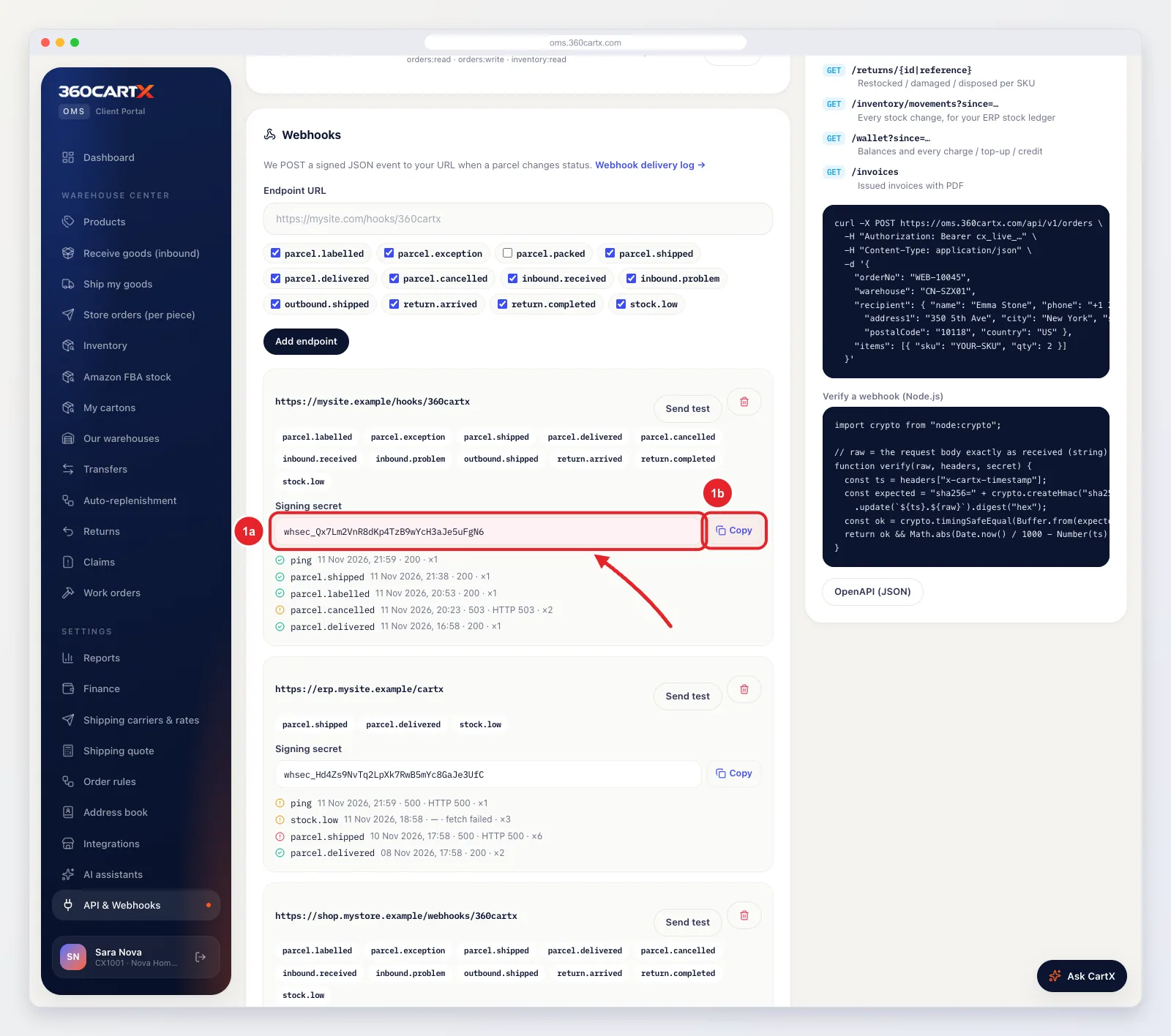
On API & Webhooks, each endpoint card has a Signing secret. It starts with whsec_ and is shown in full with a Copy button. Copy the whole text, including whsec_, into a safe setting of your system, for example an environment variable. Each endpoint has its own secret. Treat it like a password: do not put it in web pages or public code. The secret in the screenshot is fake.
- 1a Signing secret
- 1b Copy
- 2
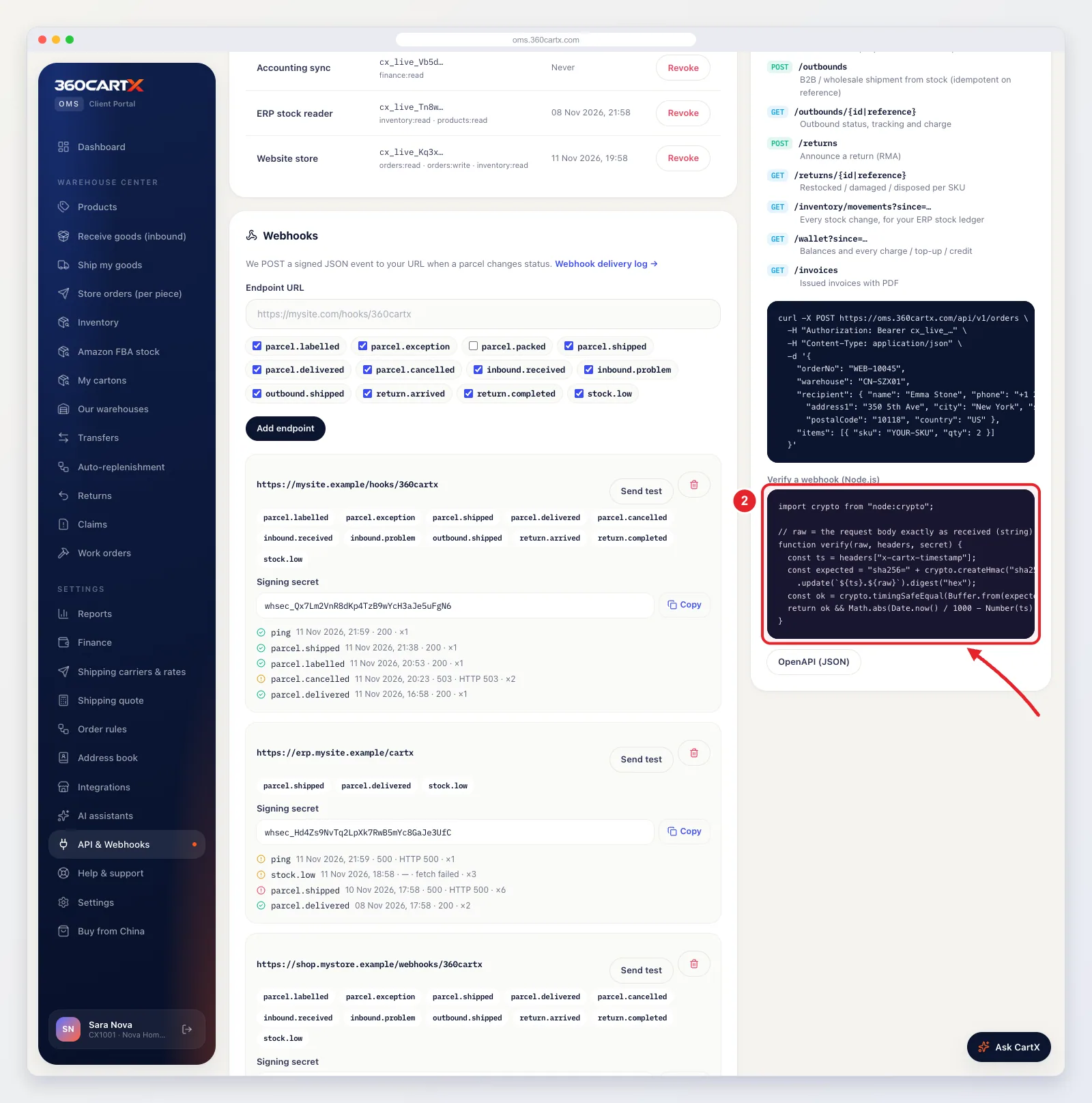
See the sample on the page
The Quick reference box has a block Verify a webhook (Node.js) with a short example. It shows the idea in a few lines. The longer examples below do the same and also handle a missing header safely.
- 3
The formula
Every message carries two headers: X-CartX-Timestamp, the time we sent it in seconds since 1970, and X-CartX-Signature. To check a message: (1) take the raw body of the request, exactly as received, as text; (2) join the timestamp, a dot and the body, like 1789122600.{...}; (3) compute HMAC with SHA-256 using your signing secret as the key and write the result as lower case hex; (4) put sha256= in front; (5) compare with X-CartX-Signature. They must be equal. (6) Check that the timestamp is not more than 5 minutes (300 seconds) away from your clock, otherwise someone may be replaying an old message. Reject the message with status 401 when any check fails.
- 4
Example in Node.js
This receives the message with Express. It is important to read the raw body: if you let your framework parse the JSON first and then write it out again, the spaces and the order of the fields can change and the signature will not match. Here express.raw keeps the exact bytes.
import express from "express"; import crypto from "node:crypto"; const SECRET = process.env.CARTX_WEBHOOK_SECRET; // whsec_… function verify(raw, headers, secret) { const ts = headers["x-cartx-timestamp"]; const given = headers["x-cartx-signature"] ?? ""; const expected = "sha256=" + crypto.createHmac("sha256", secret) .update(`${ts}.${raw}`).digest("hex"); const a = Buffer.from(expected), b = Buffer.from(given); return a.length === b.length && crypto.timingSafeEqual(a, b) && Math.abs(Date.now() / 1000 - Number(ts)) < 300; // reject replays older than 5 minutes } const app = express(); app.post("/webhooks/360cartx", express.raw({ type: "application/json" }), (req, res) => { const raw = req.body.toString("utf8"); if (!verify(raw, req.headers, SECRET)) return res.sendStatus(401); res.sendStatus(200); // answer first, work after const msg = JSON.parse(raw); // msg.event, msg.createdAt, msg.data }); - 5
Example in Python
The same check with Flask. request.get_data() gives the raw bytes before any JSON parsing, and hmac.compare_digest compares in constant time.
import hmac, hashlib, time from flask import Flask, request, abort SECRET = "whsec_…" app = Flask(__name__) def verify(raw: bytes, headers, secret: str) -> bool: ts = headers.get("X-CartX-Timestamp", "") given = headers.get("X-CartX-Signature", "") expected = "sha256=" + hmac.new(secret.encode(), ts.encode() + b"." + raw, hashlib.sha256).hexdigest() return hmac.compare_digest(expected, given) and ts.isdigit() and abs(time.time() - int(ts)) < 300 @app.post("/webhooks/360cartx") def hook(): raw = request.get_data() if not verify(raw, request.headers, SECRET): abort(401) event = request.get_json(force=True) return "", 200 - 6
Check a signature by hand
To find out why a check fails, compute the signature in a terminal from a message you saved (its timestamp, its body and your secret) and compare it with the header. The body must be saved byte for byte. If this result matches the header but your code does not, your code changes the body before checking it.
TS=1789122600 BODY='{"data":{"message":"Hello from 360CartX"},"event":"ping","createdAt":"2026-11-11T09:30:00.000Z"}' SECRET='whsec_…' printf '%s' "$TS.$BODY" | openssl dgst -sha256 -hmac "$SECRET" | sed 's/^.* //' # the header is sha256= followed by this result - 7
Why the 5 minute rule matters
A signature stays valid forever for the message it belongs to. Without the time check, someone who copied one of our messages could send it to you again later. With the check, a copy older than 5 minutes is refused. Keep your server clock correct (use automatic time). A Resend from the delivery log is signed again with a new timestamp, so it passes the check.
- 8
Change the secret
Secrets cannot be edited. If a secret leaked, add a new endpoint with the same address (it gets a new secret), switch your system to the new secret, then delete the old endpoint. During the switch both endpoints send each message, so your system receives it twice for a short time.
Terms in this article
- Webhook: A signed message we send to your URL when something changes.
Tips
- Verify the raw body, not a parsed object. Frameworks that parse JSON before your code runs are the most common reason for a wrong result.
- Use a constant-time compare (timingSafeEqual, compare_digest) and answer 401 on a mismatch.
- Log the X-CartX-Delivery header with your result: it is the id shown in our system for that delivery, handy when you ask support about a message.
- The headers are case-insensitive. Node lower-cases their names, so read x-cartx-signature there.
Common problems
The signature never matches
Check, in this order: the secret is the whole text including whsec_ and belongs to this endpoint; you hash the raw body, not parsed JSON; the text you hash is timestamp, a dot, then the body, with no spaces added; you compare with the full header value including sha256=.
It matches in my tests but not on live messages
Your test body was probably typed or re-formatted. Use the exact bytes of a real delivery, or Send test on the endpoint card.
My server says the timestamp is too old
Your clock is more than 5 minutes off, or you are checking a message you saved earlier. Fix the clock; for old messages skip the time check only in your own tests.
The sample on the page throws an error when the header is missing
The short sample compares two texts with timingSafeEqual, which fails with an error when their lengths differ. Compare the lengths first, as in the Node.js example above.
Related articles
Updated 2026-11-11
Open a ticket from Support in your portal and our team will reply.